

Satellite Service
Check any receiver by serial to view every service status, or browse a renewal service directly when you already know what you need.
Enter the 12-digit serial number to view all services linked to this receiver. Expired services can be renewed directly from the result.
Choose a service by name or receiver model. Manual renewal can continue without a serial number when needed.

ForeverTV IPTV (For MediaStar Boxes)

IPTV subscription renewal for supported Forever receiver models.


Regional renewal service for supported receiver models and packages.

Supported regional service renewals for compatible receivers.

Premium renewal package for supported BOX and TV Stick devices.
Use Device Check when the serial is available. Otherwise choose the service you recognize and continue with manual renewal.
Use the serial checker when available, or select a renewal service manually.
Check by serial for live device status, or browse renewal services manually.
Open the service details and review available renewal periods and pricing.
Add the receiver serial when available. Manual renewal can continue without it.
Finish the secure renewal flow and track the order in your account.
Find the 12-digit serial on the receiver label or device information screen, or scan a clear photo.
Return to Device Check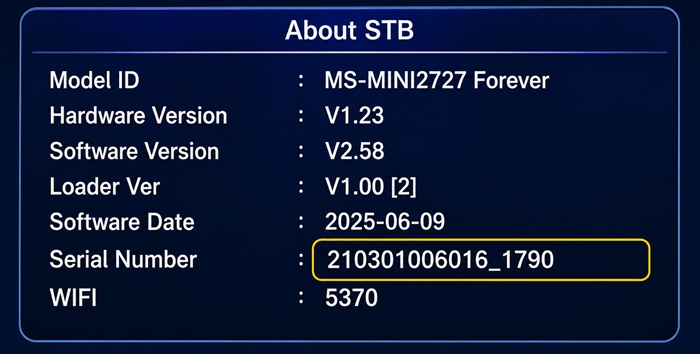
Check the rear or bottom label and locate the receiver serial number.
Open the receiver information or system information screen and locate the serial.
Upload a clear image of the device label or information screen for automatic detection.